Operations knowledge was stuck on individual laptops
The customer team runs application services, data synchronization, and infrastructure workloads across several clusters. It already had monitoring, logs, GitOps, and Slack. What slowed the team down was that deployments and investigations still depended on a few people who knew each environment well.
To release an application, update a service, deploy infrastructure, or investigate a failure, an engineer first had to find the right cluster and repository, then assemble the local tools, permissions, and context. Someone familiar with the environment could move quickly. Someone else often had to reconstruct the process.
Some engineers used Codex on their own computers to help with deployments and investigations. That made an individual faster, but the capability still belonged to that person. Other developers could not reuse the local setup and still had to ask for help.
The customer did not need another local tool. It needed one operations entry point the team could use, with a clear permission boundary and a visible execution trail.
Before: deployments and investigations waited for an owner
A deployment request usually began as a manual handoff. A developer found an operations engineer and explained the service, revision, and target environment. The operations engineer opened a local setup, checked the repository, cluster state, and delivery path, then performed the work and reported the result.
Incidents followed the same pattern. Alerts reached Slack quickly, but the investigation waited for someone to start. Engineers manually assembled Pod state, service availability, business progress, and GitOps reconciliation before deciding whether to restart, roll back, or change configuration.
The same few people had to interpret the request, perform the operation, and explain the outcome. Developers had no common entry point, and operating knowledge remained scattered across laptops, command histories, and memory.
Consulting starts with the real work
Hast did not begin by delivering a general-purpose bot. FDE engineers and the customer mapped real deployment requests, alerts, and investigations, then took each workflow apart step by step.
They first defined the input: what would be deployed, which environment it belonged in, and which GitOps or infrastructure path to use. They then defined the Agent's tools, target clusters, action scope, and verification criteria. Read-only investigation, pre-authorized actions, and production changes that require a person were kept separate.
Task and permission design happened together. The teams decided who could start a request, which environments the Agent could access, and which resources it was explicitly forbidden to read. Deployment progress, alert investigation, approval requests, and verification all return to the original Slack thread.
The customer kept its environment knowledge and production decisions. Hast handled Agent design, tool integration, permission boundaries, and evaluation. The operating workflows agreed during consulting became rules the DevOps Agent could repeat.
After: the team has a shared operations entry point
Authorized developers no longer need access to an operations engineer's laptop or their own local Codex setup. They can ask the DevOps Agent in Slack to deploy or investigate. When an alert arrives, the Agent can begin work automatically.
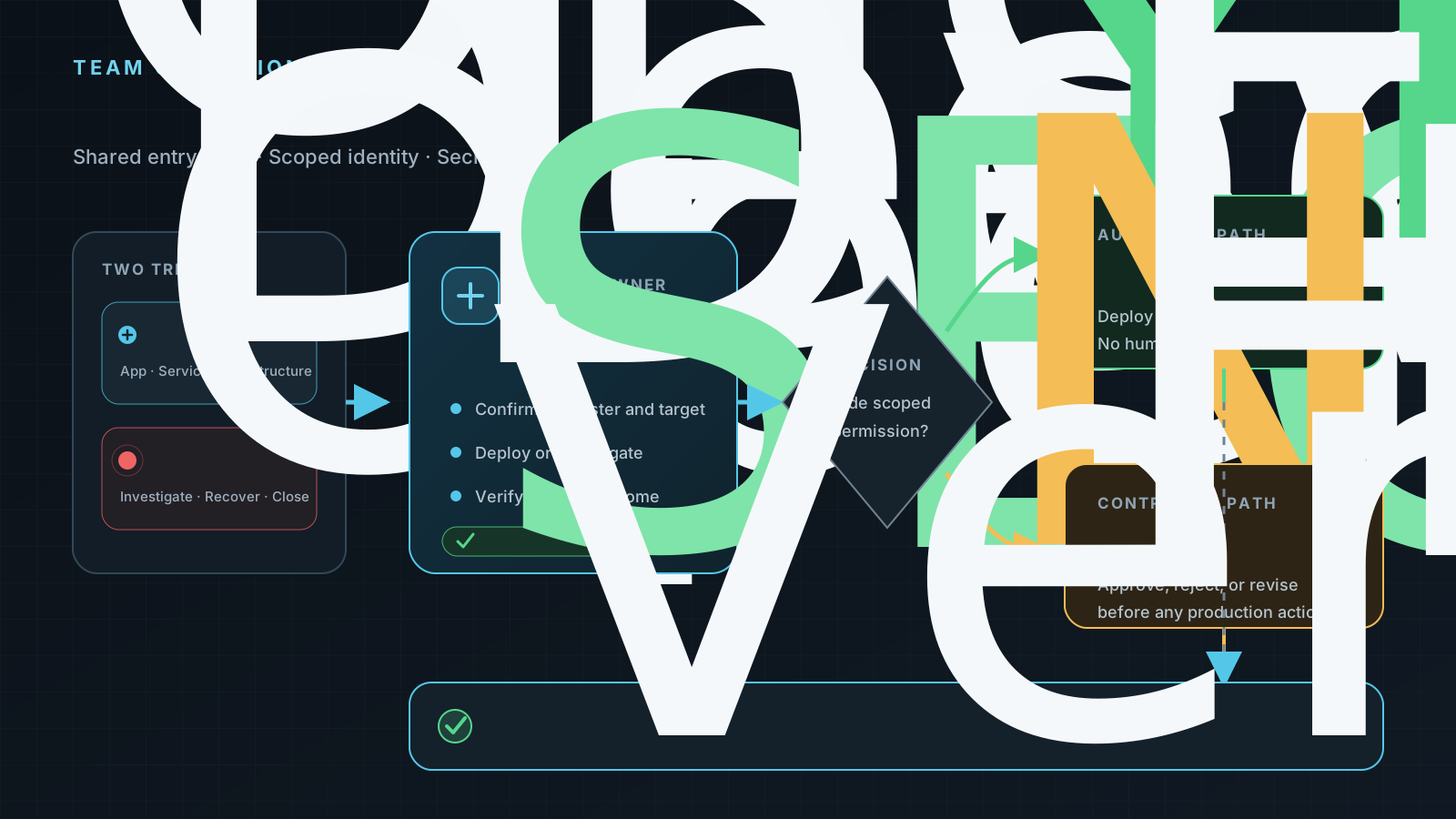
One entry point handles deployments and alerts. The Agent acts only within its authorized scope; a person decides on production actions beyond that boundary.
The Agent first confirms the environment, service, and requested change, then follows the team's existing delivery path. While it works, it checks GitOps, workload, and service state and writes the evidence back to the original thread. The requester can see what is happening, how far it has progressed, and whether the change actually took effect.
This does not distribute operations credentials to every laptop. Developers receive a controlled task entry point. The Agent uses its own restricted identity and tools.
Deployments no longer depend on a local setup
Application deployments, service updates, and infrastructure deployments can all begin with the shared DevOps Agent. A developer supplies the target environment and delivery request. The Agent finds the agreed workflow, performs the authorized steps, and verifies the result.
Verification does not stop at a successful command. Application and service deployments continue through rollout state, workload readiness, service routing, and health checks. Infrastructure deployments include GitOps reconciliation and target-resource state. The Agent does not mark a task complete when the evidence is incomplete.
When an operation falls outside the pre-authorized scope, the Agent states the target, impact, and verification plan before waiting for approval. If the team rejects or changes the proposal, the Agent does not proceed with the original action.
For developers, the change is simple. They previously had to ask someone else to perform the work or reproduce the entire setup locally. With team authorization, they can now use the same Agent to move a standard deployment forward and see the full result in Slack.
When an alert arrives, the Agent picks it up
Beyond deployments, an Opsgenie alert in Slack triggers the DevOps Agent directly. No engineer has to mention it first. The Agent reads the context, calls operations tools with limited access, follows the agreed rules, waits for recovery when needed, verifies the result, merges duplicate alerts, and closes the original thread.
None of the three selected alert samples waited for a human instruction.
For a data-synchronization alert, the Agent checked upstream connectivity and business progress. It waited for the recovery to settle, then verified monitoring and GitOps. Handling took about five minutes.
For an application-workload alert, the Agent followed a rolling replacement triggered by Secret synchronization. It closed the incident in about seven minutes, after the new workload was Ready with no restarts, both health checks returned HTTP 200, and monitoring and GitOps had recovered.
For a high-availability database alert, the Agent followed the primary takeover and recovery of the original instance. It checked primary and replica health, replication lag, dependent services, and alert state without waiting for an engineer to issue a command.
Automatic handling does not mean changing production every time. Sometimes a controller or HA system recovers on its own, and the Agent's job is to watch the process and decide whether the service is genuinely healthy. Restarts, rollbacks, and configuration changes outside the pre-authorized scope still wait for human approval.
The times on this page describe these selected incidents only. They are not an SLA, an average response time, or an overall success rate.
Share the capability, not the Secrets
The team expanded access to operations work without expanding exposure to Secrets.
The DevOps Agent uses its own identity, with permissions limited by environment, namespace, and action type. It can perform authorized deployments and checks, but it cannot read Kubernetes Secrets or Secret values from development environments.
Credentials needed for delivery stay inside controlled platform boundaries. They do not enter the Agent's prompt, public readback, or Slack replies. The Agent sees the tools it may call, non-sensitive parameters, and execution results—not the underlying credentials.
This boundary is not a prompt instruction. The trigger, Agent identity, and infrastructure permissions all constrain what it can do. An action outside that scope stops or moves to human approval.
What changed
| Before | After |
|---|---|
| BeforeDeployments depended on a few operations engineers or a local Codex setup | AfterAuthorized developers start standard deployments through a shared DevOps Agent |
| BeforeAlerts waited for an engineer to begin the investigation | AfterAlerts trigger the Agent to collect evidence and follow the incident |
| BeforeTools, context, and command records were scattered across individual laptops | AfterProgress, approvals, and verification remain in one Slack thread |
| BeforePermissions followed each person's local environment | AfterThe Agent uses a separate, restricted identity with Secret reads explicitly denied |
The biggest change is not fewer commands. Operations became a team workflow instead of an individual tool. Developers can move authorized work forward themselves, and an operations engineer no longer has to serve as the intermediary for every deployment and investigation.
Put more operating knowledge into rules
Next, the teams can select more frequent deployment and incident scenarios and turn their response methods into environment-specific rules. Each rule needs a clear input, permission scope, verification standard, and finish condition.
A fixed evaluation set can check whether deployments are complete, investigations are reliable, human takeover happens at the right time, and post-change verification is sufficient. Each real task gives the shared operations workflow another practical test.